autoware_map_projection_loader#
Feature#
autoware_map_projection_loader is responsible for publishing map_projector_info that defines in which kind of coordinate Autoware is operating.
This is necessary information especially when you want to convert from global (geoid) to local coordinate or the other way around.
- If
map_projector_info_pathDOES exist, this node loads it and publishes the map projection information accordingly. - If
map_projector_info_pathdoes NOT exist, the node assumes that you are using theMGRSprojection type, and loads the lanelet2 map instead to extract the MGRS grid.- DEPRECATED WARNING: This interface that uses the lanelet2 map is not recommended. Please prepare the YAML file instead.
Map projector info file specification#
You need to provide a YAML file, namely map_projector_info.yaml under the map_path directory. For pointcloud_map_metadata.yaml, please refer to the Readme of autoware_map_loader.
sample-map-rosbag
├── lanelet2_map.osm
├── pointcloud_map.pcd
├── map_projector_info.yaml
└── pointcloud_map_metadata.yaml
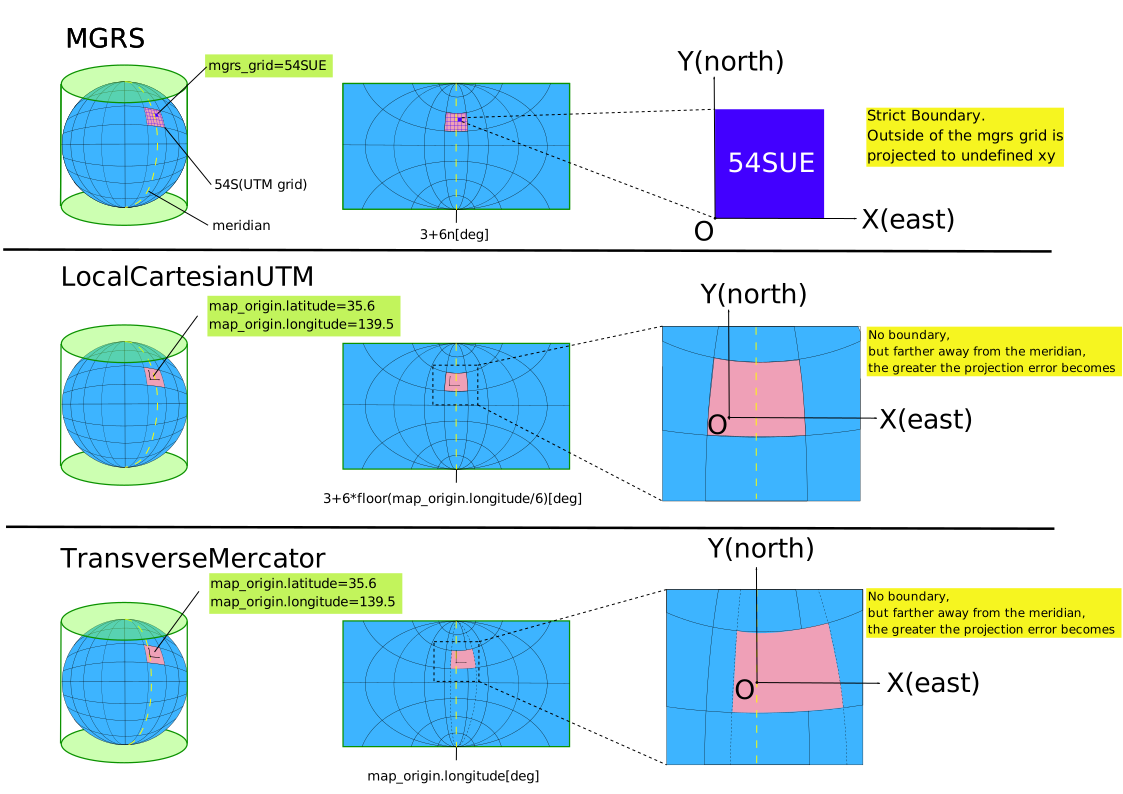
There are three types of transformations from latitude and longitude to XYZ coordinate system as shown in the figure below. Please refer to the following details for the necessary parameters for each projector type.
Using local coordinate#
# map_projector_info.yaml
projector_type: Local
Note that even if you input scale_factor, it will be overwritten to 1.0.
The projector_type value is case-sensitive and must be exactly Local. The previously accepted lowercase local is no longer supported and will be rejected.
Limitation#
The functionality that requires latitude and longitude will become unavailable.
The currently identified unavailable functionalities are:
- GNSS localization
- Sending the self-position in latitude and longitude using ADAPI
Using MGRS#
If you want to use MGRS, please specify the MGRS grid as well.
# map_projector_info.yaml
projector_type: MGRS
vertical_datum: WGS84
mgrs_grid: 54SUE
Note that even if you input scale_factor, it will be overwritten to 0.9996.
Limitation#
It cannot be used with maps that span across two or more MGRS grids. Please use it only when it falls within the scope of a single MGRS grid.
Using LocalCartesianUTM#
If you want to use local cartesian UTM, please specify the map origin as well.
# map_projector_info.yaml
projector_type: LocalCartesianUTM
vertical_datum: WGS84
map_origin:
  latitude: 35.6762 # [deg]
  longitude: 139.6503 # [deg]
Note that even if you input scale_factor, it will be overwritten to 0.9996.
Using LocalCartesian#
If you want to use local cartesian WGS84, please specify the map origin as well.
Currently LocalCartesian can only be used in lanelet2_map_loader, packages like gnss_poser doesn't support it right now.
# map_projector_info.yaml
projector_type: LocalCartesian
vertical_datum: WGS84
map_origin:
  latitude: 35.6762 # [deg]
  longitude: 139.6503 # [deg]
Note that even if you input scale_factor, it will be overwritten to 1.0.
Using TransverseMercator#
If you want to use Transverse Mercator projection, please specify the map origin as well. And specify the scale_factor of the map. If you didn't specify the scale_factor, it will be set 0.9996 as default value.
# map_projector_info.yaml
projector_type: TransverseMercator
vertical_datum: WGS84
map_origin:
  latitude: 35.6762 # [deg]
  longitude: 139.6503 # [deg]
scale_factor: 0.9996
Vertical Datum#
Autoware uses the WGS84 ellipsoid as its default height reference.
If you need orthometric heights based on the EGM2008 geoid, install the required dataset for GeographicLib as shown below:
# Install the GeographicLib helper tools
sudo apt update && sudo apt install geographiclib-tools

# Download and register the 1-arc-minute EGM2008 geoid grid
sudo geographiclib-get-geoids egm2008-1
Published Topics#
~/map_projector_info(autoware_map_msgs/MapProjectorInfo) : This topic shows the definition of map projector information
Parameters#
Note that these parameters are assumed to be passed from launch arguments, and it is not recommended to directly write them in map_projection_loader.param.yaml.
| Name | Type | Description | Default | Range |
|---|---|---|---|---|
| map_ |
string | The path where map_projector_info.yaml is located | $(var map_ |
N/A |
| lanelet2_ |
string | The path where the lanelet2 map file (.osm) is located | $(var lanelet2_ |
N/A |