Learned Model#
This is the design document for the Python learned model used in the simple_planning_simulator package.
Purpose / Use cases#
This library creates an interface between models in Python and PSIM (C++). It is used to quickly deploy learned Python models in PSIM without a need for complex C++ implementation.
Design#
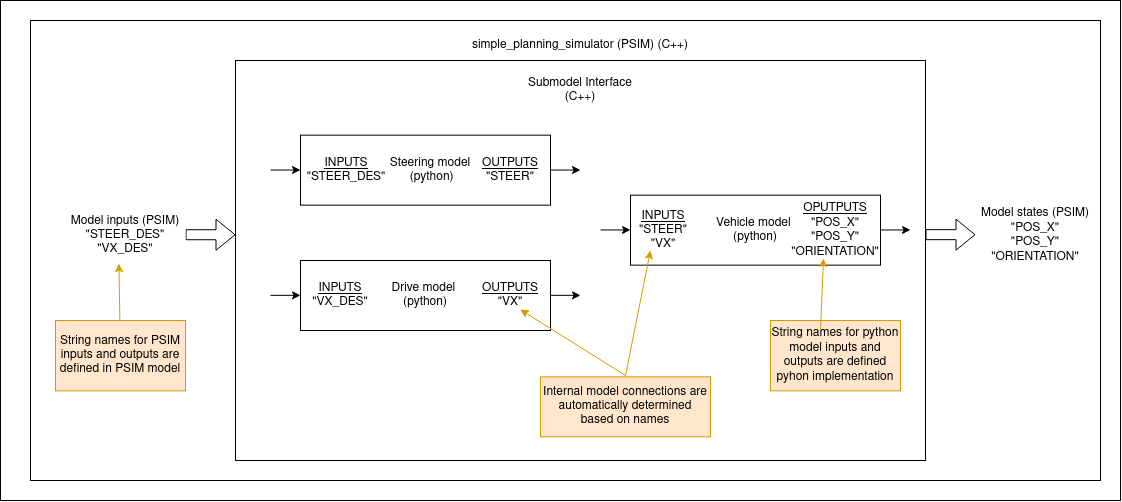
The idea behind this package is that the model we want to use for simulation consists of multiple sub-models (e.g., steering model, drive model, vehicle kinematics, etc.). These sub-models are implemented in Python and can be trainable. Each sub-model has string names for all of its inputs/outputs, which are used to create model interconnections automatically (see image below). This allows us to easily switch sub-models for better customization of the simulator.
Assumptions / Known limits#
To use this package python3 and pybind11 need to be installed. The only assumption on Python sub-models is their interface.
```python class PythonSubmodelInterface:
def forward(self, action, state):  # Required
    """
    Calculate forward pass through the model and returns next_state.
    """
    return list()

def get_state_names(self):  # Required
    """
    Return list of string names of the model states (outputs).
    """
    return list()

def get_action_names(self):  # Required
    """
    Return list of string names of the model actions (inputs).
    """
    return list()

def reset(self):  # Required
    """
    Reset model. This function is called after load_params().
    """
    pass

def load_params(self, path):  # Required
    """
    Load parameters of the model.
    Inputs:
        - path: Path to a parameter file to load by the model.
    """
    pass

def dtSet(self, dt):  # Required
    """
    Set dt of the model.
    Inputs:
        - dt: time step
    """
    pass
```
API#
To successfully create a vehicle model an InterconnectedModel class needs to be set up correctly.
InterconnectedModel class#
Constructor#
The constructor takes no arguments.
void addSubmodel(std::tuple<std::string, std::string, std::string> model_descriptor)#
Add a new sub-model to the model.
Inputs:
- model_descriptor: Describes what model should be used. The model descriptor contains three strings:
- The first string is a path to a python module where the model is implemented.
- The second string is a path to the file where model parameters are stored.
- The third string is the name of the class that implements the model.
Outputs:
- None
void generateConnections(std::vector<char *> in_names, std::vector<char*> out_names)#
Generate connections between sub-models and inputs/outputs of the model.
Inputs:
- in_names: String names for all of the model inputs in order.
- out_names: String names for all of the model outputs in order.
Outputs:
- None
void initState(std::vector<double> new_state)#
Set the initial state of the model.
Inputs:
- new_state: New state of the model.
Outputs:
- None
std::vector<double> updatePyModel(std::vector<double> psim_input)#
Calculate the next state of the model by calculating the next state of all of the sub-models.
Inputs:
- psim_input: Input to the model.
Outputs:
- next_state: Next state of the model.
dtSet(double dt)#
Set the time step of the model.
Inputs:
- dt: time step
Outputs:
- None
Example#
Firstly we need to set up the model.
```C++ InterconnectedModel vehicle;
// Example of model descriptors
std::tuple
std::tuple
// Create sub-models based on descriptors vehicle.addSubmodel(model_descriptor_1); vehicle.addSubmodel(model_descriptor_2);
// Define STATE and INPUT names of the system
std::vector
// Automatically connect sub-systems with model input vehicle.generateConnections(input_names, state_names);
// Set the time step of the model vehicle.dtSet(dt); ```
After the model is correctly set up, we can use it the following way.
```C++
// Example of an model input
std::vector
// Example of an model state
std::vector
// Set model state vehicle.initState(current_state);
// Calculate the next state of the model
std::vector